Daniel Ngounou
Projects Meeting notes Ai
Business UX/UI Design Staff Experience

Meeting Notes AI

Built an intelligent meeting companion that captures audio, converts it into clear, actionable notes, and helps users stay focused during conversations without worrying about missing key details.

Timeline: ~1 month
Role: Lead UX Designer
Client: Self initiated project

Project Overview

The Client

This was a self-initiated project I designed and developed as part of my exploration in AI-driven productivity tools. The goal was to create an intelligent meeting assistant that helps users capture, organize, and retrieve important information effortlessly without disrupting the natural flow of conversations.

The Challenge

The challenge was to design a seamless and intuitive system that enhances productivity during meetings while minimizing cognitive load. Traditional note-taking methods often distract users and lead to incomplete or unstructured information, making it difficult to revisit key insights later.

  • Ensuring accurate audio capture and transcription in real time
  • Designing a distraction-free interface that allows users to stay engaged in conversations.
  • Structuring unorganized speech into clear, actionable summaries.
  • Providing an efficient way to categorize and retrieve past meetings.
  • Balancing automation with user control to maintain trust and usability.

Project Goals

The primary goal of this project was to design and develop an intelligent meeting assistant that simplifies the way users capture and interact with information during meetings. The focus was on creating a seamless experience that enhances productivity without interrupting natural conversations.

Key objectives included:

  • Enable effortless recording of meetings with minimal user interaction
  • Convert spoken conversations into accurate, readable text
  • Transform raw transcripts into structured and actionable summaries
  • Create an intuitive interface that doesn't distract from conversations
  • Ensure a smooth and reliable experience across different usage scenarios (start, pause, resume, and save recordings).
  • Build trust through transparent AI processing and user control

My Role

I led the end-to-end design and development of the Meeting Notes AI application, taking ownership of both the user experience and technical implementation.

My responsibilities included:

  • Product Design: Defined the overall user experience, user flows, and interaction patterns to ensure a seamless and intuitive journey
  • UI/UX Design: Designed clean and minimal interfaces focused on reducing distractions during active meetings
  • Front-End Development: Built the application using React Native and modern development frameworks
  • AI Integration: Implemented speech-to-text functionality and AI-powered summarization features
  • User Research: Conducted interviews with professionals to understand meeting pain points and workflow requirements
  • Prototyping & Testing: Created interactive prototypes and conducted usability testing to validate design decisions

Research & Discovery

Research Methodology

  • Informal interviews with students to understand challenges faced during meetings, note-taking, and information retention
  • Observational analysis of how users behave during meetings (distractions, multitasking, missed details)
  • Identification of pain points in existing note-taking and meeting apps (complex interfaces, cognitive overload, poor organization)
  • Personal experience insights from participating in academic and collaborative meetings
  • Comparative analysis of existing meeting and productivity tools
  • Iterative feedback from peers and early design concepts and usability

Key Findings

  • Users often miss important details during meetings due to divided attention between listening and note-taking
  • Existing note-taking and meeting apps are perceived as overly complex and disrupt the natural flow of conversations
  • Many users rely on fragmented methods (notes app, memory, recordings) leading to disorganized and hard-to-retrieve information
  • There is a strong need for automated summarization to transform long conversations into clear, actionable insights
  • Users value simplicity and speed, preferring tools that require minimal interaction during meetings
  • Difficulty in organizing and retrieving past meeting notes reduces the long-term usefulness of recorded information

User Personas

David N.

David N.

Software Engineering Student

A student who regularly attends lectures, group meetings, and project discussions. He often struggles to keep up with note-taking while actively participating, leading to missed details and incomplete notes.

Regular meeting participant Multitasker Tech-savvy
Amina K.

Amina K.

Team Lead / Project Coordinator

A highly organized individual who manages multiple meetings and needs clear, structured summaries to track decisions, tasks, and follow-ups. Values efficiency and actionable insights from every discussion.

Productivity-focused Organization-driven Decision-oriented
Key Requirements:
  • Effortless recording with minimal interaction
  • Accurate transcription of conversations
  • Clear and structured meeting summaries
  • Ability to organize meetings into groups or categories
  • Quick access to past meetings and key points
  • Distraction-free and intuitive interface

Problem Statement

"Students and professionals face significant challenges during meetings due to the need to balance active participation with note-taking. Important details are often missed, and existing note-taking tools tend to be either too simplistic or overly complex, disrupting the natural flow of conversations. As a result, information becomes fragmented, unstructured, and difficult to retrieve later. The lack of an intelligent, seamless solution leads to reduced productivity, poor information retention, and inefficient collaboration. A modern solution is needed to capture, organize, and transform conversations into clear, actionable insights without interrupting the user experience."

Competitive Analysis Insights

  • Existing meeting and note-taking tools often prioritize features over simplicity, leading to cluttered user experiences
  • Many platforms offer transcription but lack meaningful summarization or actionable insights
  • Some solutions require heavy user interaction, which disrupts engagement during meetings
  • Tools with strong AI capabilities often lack intuitive organization and retrieval systems
  • The most effective platforms balance automation with user control and maintain a clean, distraction-free interface
  • There is a gap in solutions that seamlessly integrate recording, summarization, and organization in one unified experience
Design Process

1. Information Architecture

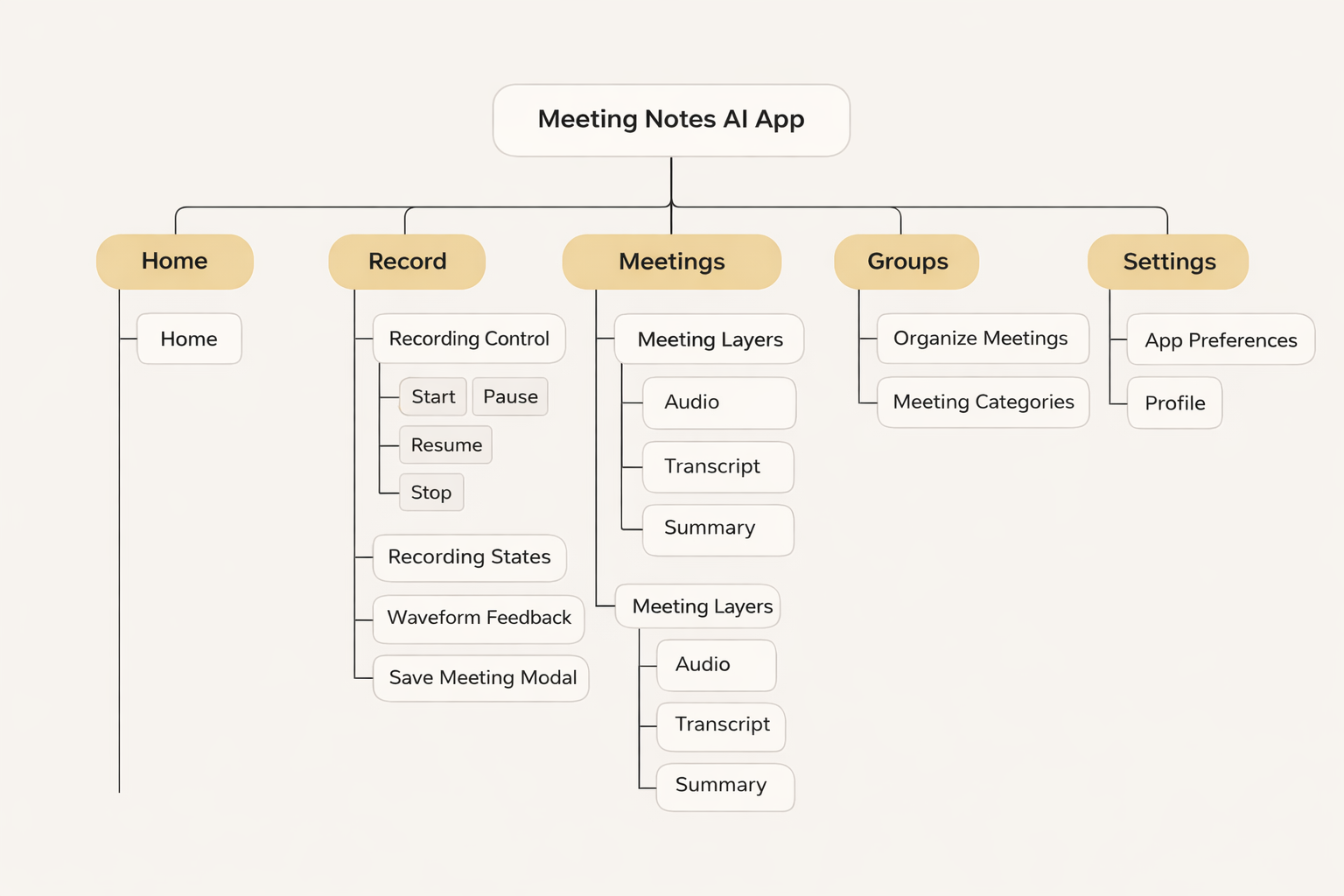
Based on research findings, I structured the application to transform unstructured conversations into organized, accessible, and actionable information. The architecture focuses on minimizing friction during meetings while ensuring that captured data is easy to navigate, retrieve, and manage afterward.

Key Structural Decisions:

  • Organized the app into clear core modules (Home, Record, Meetings, Groups, Settings) to simplify navigation
  • Designed a centralized Recording Interface with quick access to start, pause, resume, and stop actions
  • Structured meeting outputs into distinct layers (Audio, Transcript, Summary) for better clarity and usability
  • Introduced a Meeting Organization System allowing users to group and categorize recordings for easy retrieval
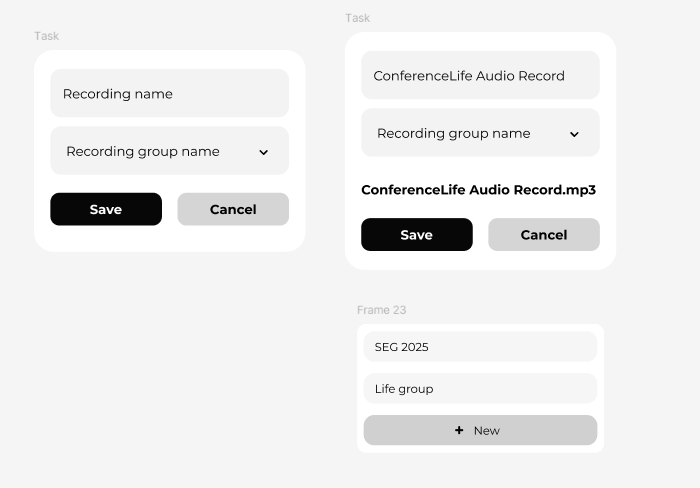
  • Simplified the saving flow with a modal that enables naming and assigning recordings to specific groups
  • Ensured consistent terminology across the app (e.g., “Meetings,” “Groups,” “Summaries”) to reduce confusion
Information Architecture Diagram

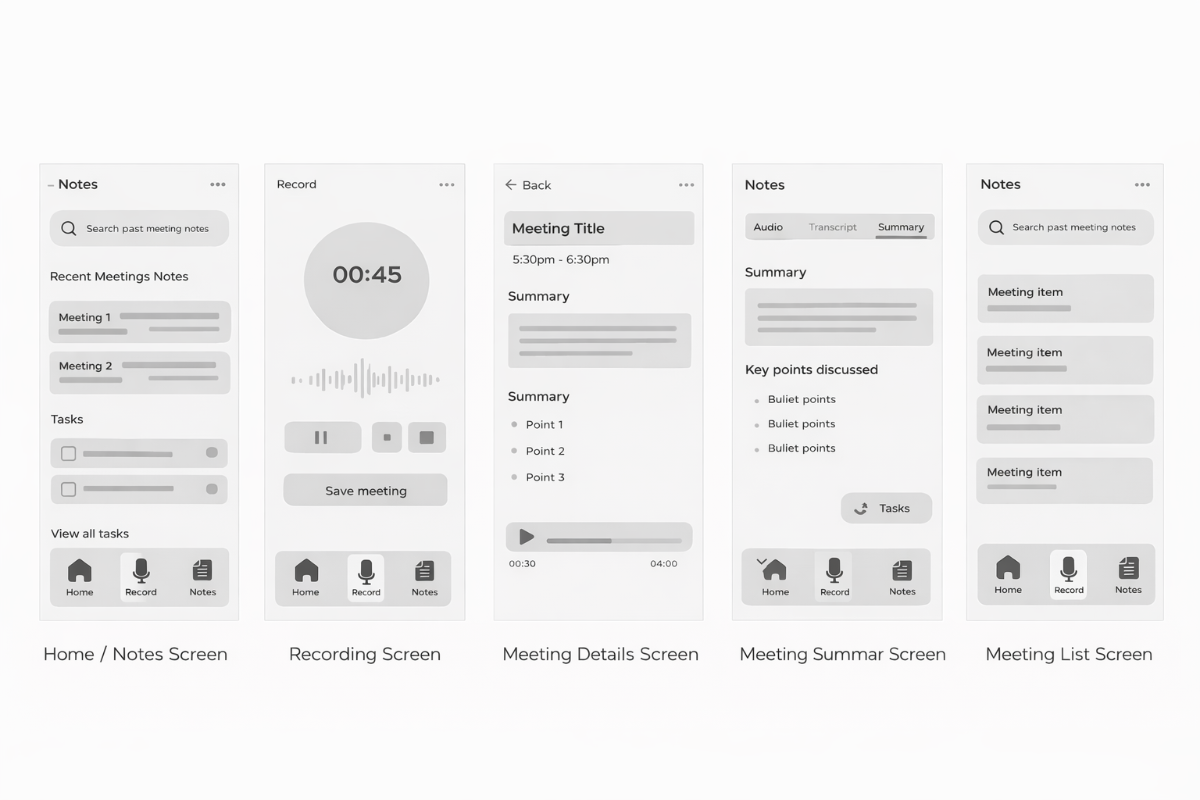
2. Wireframing

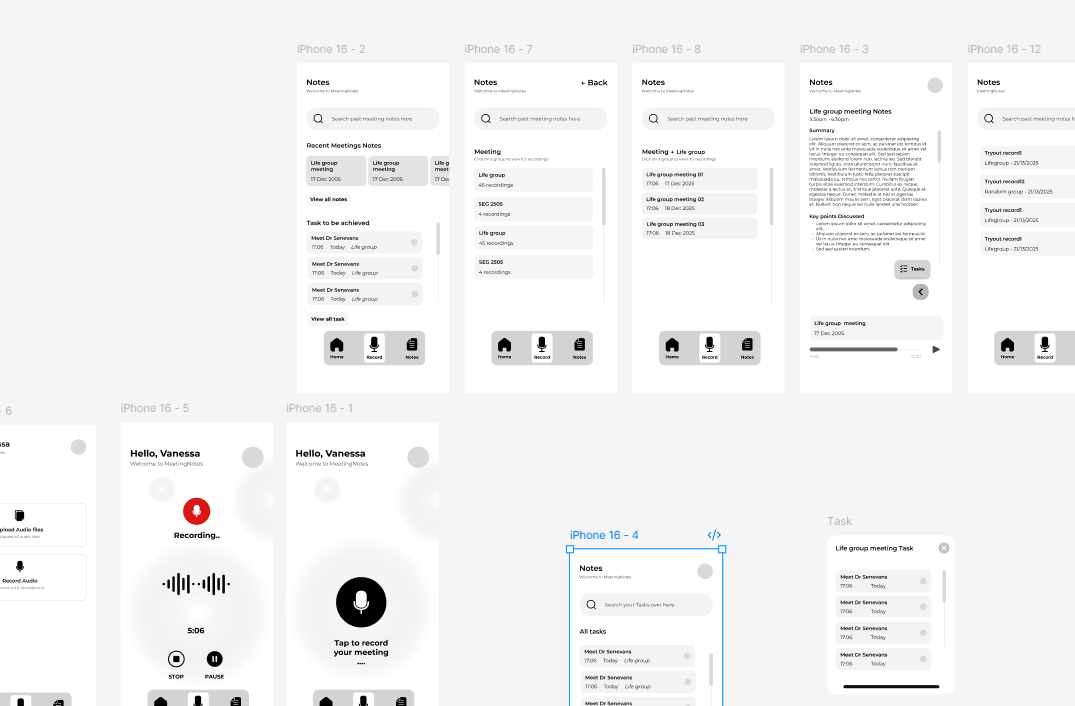
I created low-fidelity wireframes to establish the basic layout and functionality of key screens. This allowed for quick iteration and feedback from stakeholders before moving to higher fidelity designs.

Meeting Notes AI Wireframes Carousel

Wireframing Approach:

  • Created low-fidelity wireframes to define the core structure and user flow of key screens
  • Focused on simplifying interactions to reduce cognitive load during active meetings
  • Iterated rapidly based on personal testing and real usage scenarios during meetings
  • Validated navigation and usability through informal feedback from peers
  • Refined layouts to ensure a seamless transition between recording, reviewing, and organizing meetings

3. High-Fidelity Prototypes

Based on the validated wireframes, I developed high-fidelity prototypes for the Meeting Notes AI app, focusing on a clean, distraction-free interface and a seamless user experience. The design emphasizes clarity, intuitive navigation, and smooth interactions to support users during and after meetings. The prototypes were fully interactive, allowing for usability testing of key flows such as recording meetings, reviewing transcripts and summaries, and organizing notes into groups. Particular attention was given to minimizing cognitive load during active conversations.

Design System Development:

Recording Red

#FF3B30

Primary Dark

#1C1C1E

Background Gray

#F2F2F7

System Blue

#007AFF

I developed a comprehensive design system including color palette, typography, components, and interaction patterns to ensure consistency across the platform and facilitate developer handoff.

Typography System Component Library Interaction Patterns Accessibility Guidelines

4. Usability Testing

I conducted informal usability testing through real-life usage scenarios and feedback from peers who regularly participate in meetings. The testing focused on evaluating how effectively users could record, review, and organize meeting content without disrupting their natural workflow.

Testing Results:

  • Users were able to record meetings effortlessly with minimal interaction, allowing them to stay focused on conversations
  • The recording flow (start, pause, resume, stop) was intuitive and required little to no learning curve
  • Participants appreciated the ability to access structured summaries instead of revisiting full recordings
  • The overall interface was perceived as clean and distraction-free, enhancing usability during active meetings
  • Feedback highlighted the importance of accuracy and clarity in AI-generated summaries for user trust

5. Refinement & Final Delivery

Based on usability insights and continuous iteration, I refined the Meeting Notes AI app to ensure a seamless, reliable, and intuitive user experience. The final design focused on reducing friction during active meetings while improving clarity and accessibility when reviewing and organizing captured information.

Key Refinements:

  • Simplified the recording flow to make start, pause, resume, and stop actions more intuitive and accessible
  • Improved the meeting saving process with a streamlined modal for quick naming and group assignment
  • Enhanced the structure of summaries to present clearer, more actionable insights
  • Refined navigation between recording, meetings, and groups for a smoother user journey
  • Improved visual feedback during recording (e.g., waveform and timer) to increase user confidence
  • Standardized terminology across the app (e.g., consistent use of "Meetings," "Groups," "Summaries")

Deliverables:

  • High-fidelity interactive prototypes covering all key user flows
  • Complete UI/UX design system with reusable components (buttons, cards, navigation patterns)
  • Structured user flows and information architecture documentation
  • Design specifications to guide front-end implementation
  • A fully designed mobile experience focused on AI-powered meeting capture and organization

Key Features & Solutions

AI-Powered Meeting Capture

Transformed traditional note-taking into an intelligent, automated process that allows users to stay fully engaged during conversations.

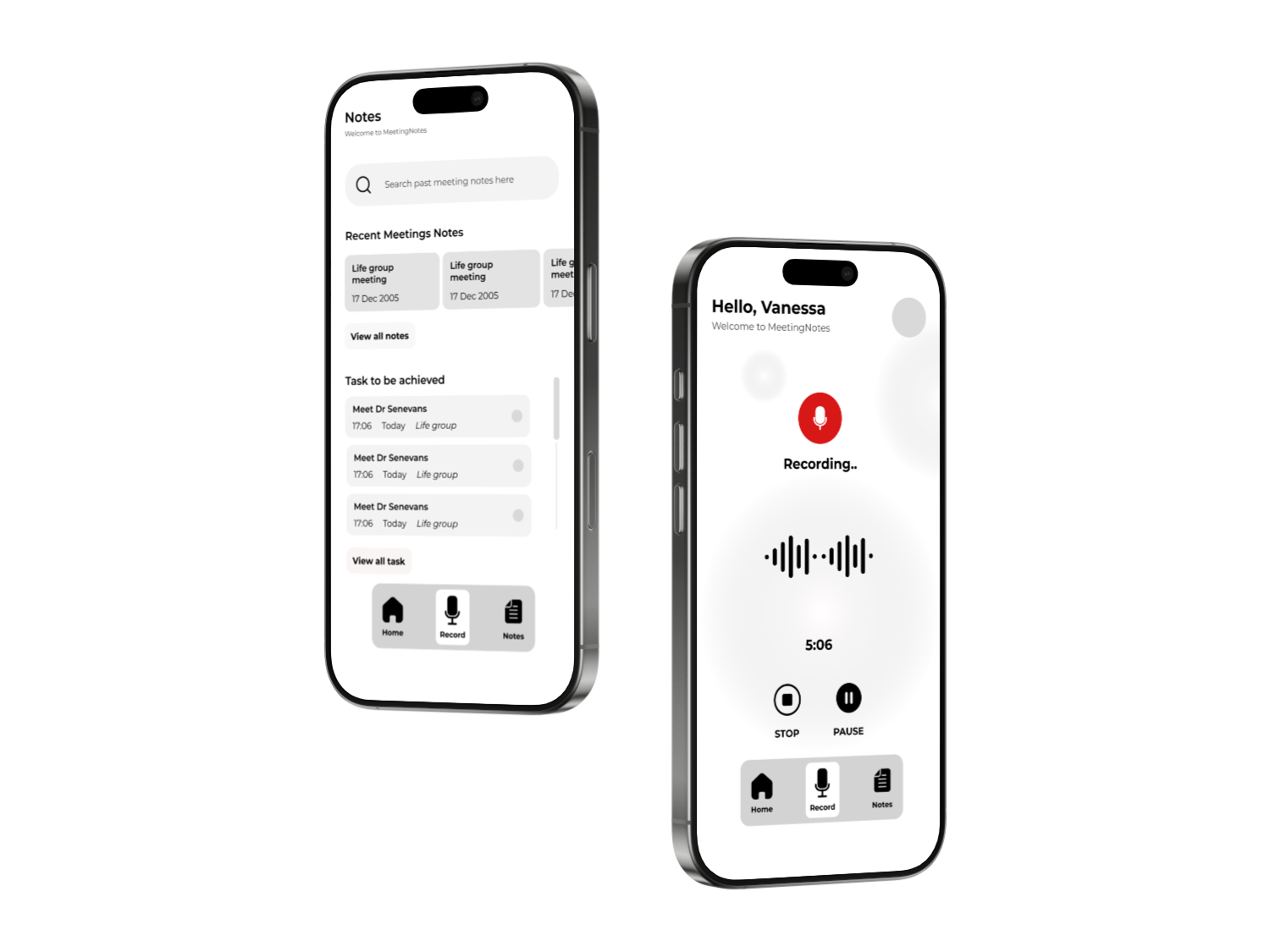
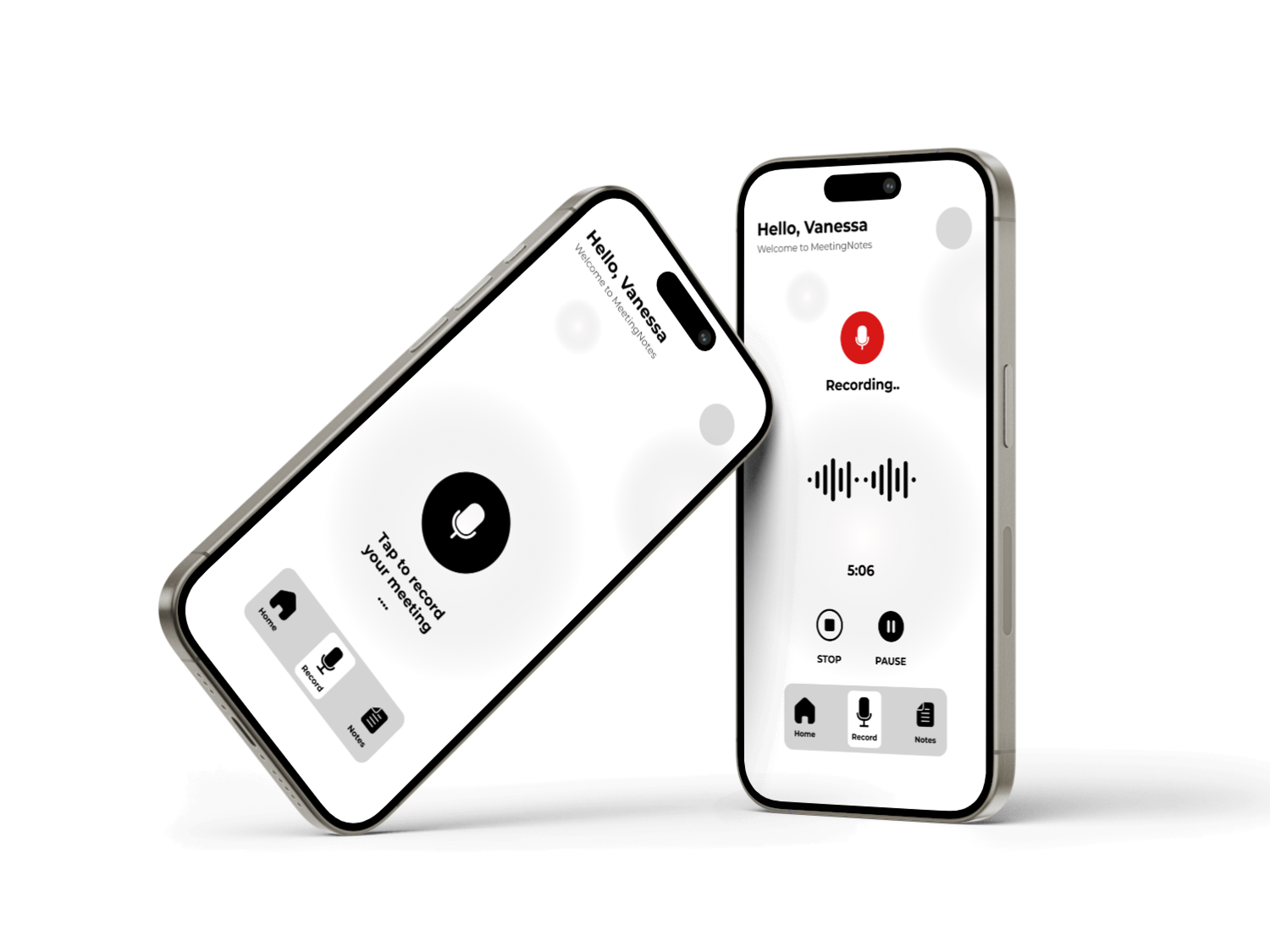
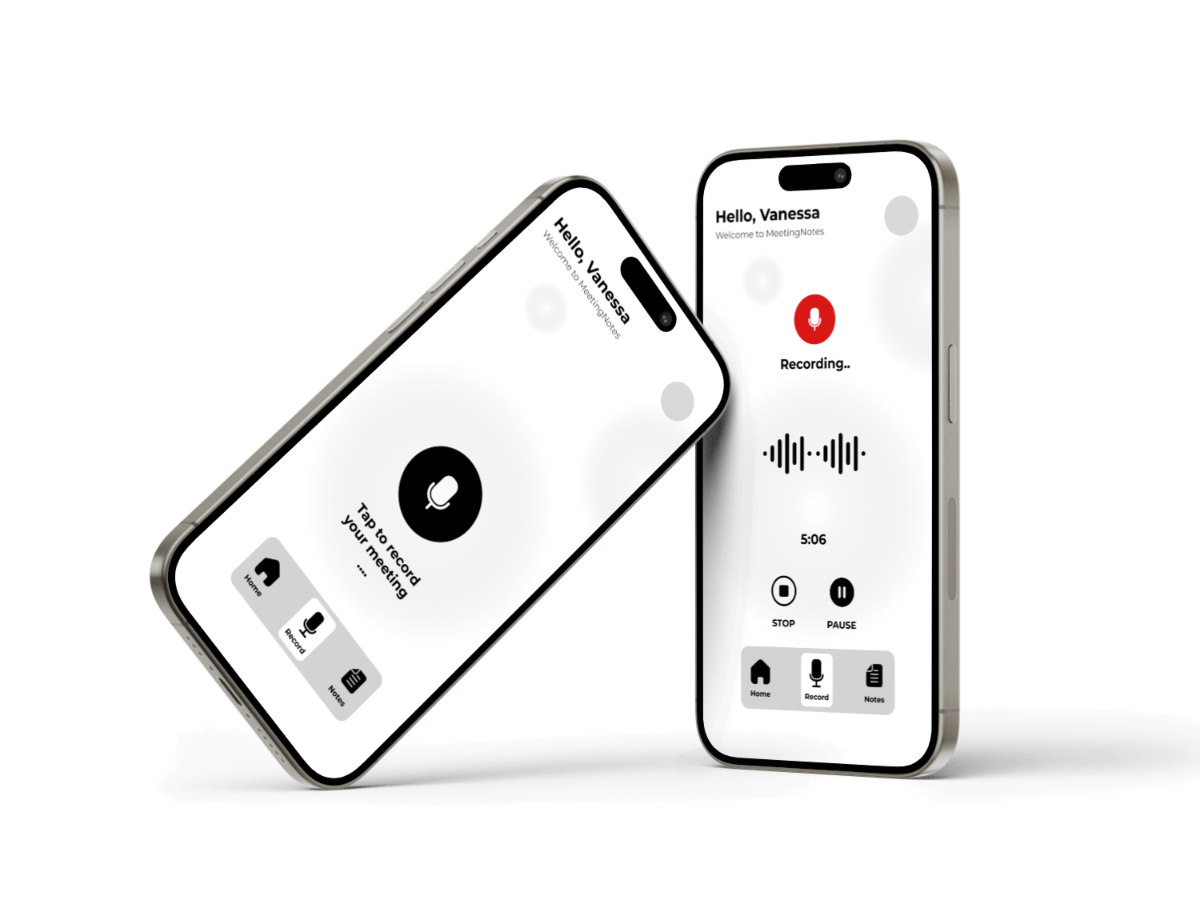
  • One-tap recording with pause, resume, and stop functionality
  • Real-time audio capture with visual feedback (waveform & timer)
  • Seamless transition from recording to saved meeting
Meeting Capture Interface

Smart Transcription & Summarization

Converted unstructured conversations into clear, readable, and actionable insights.

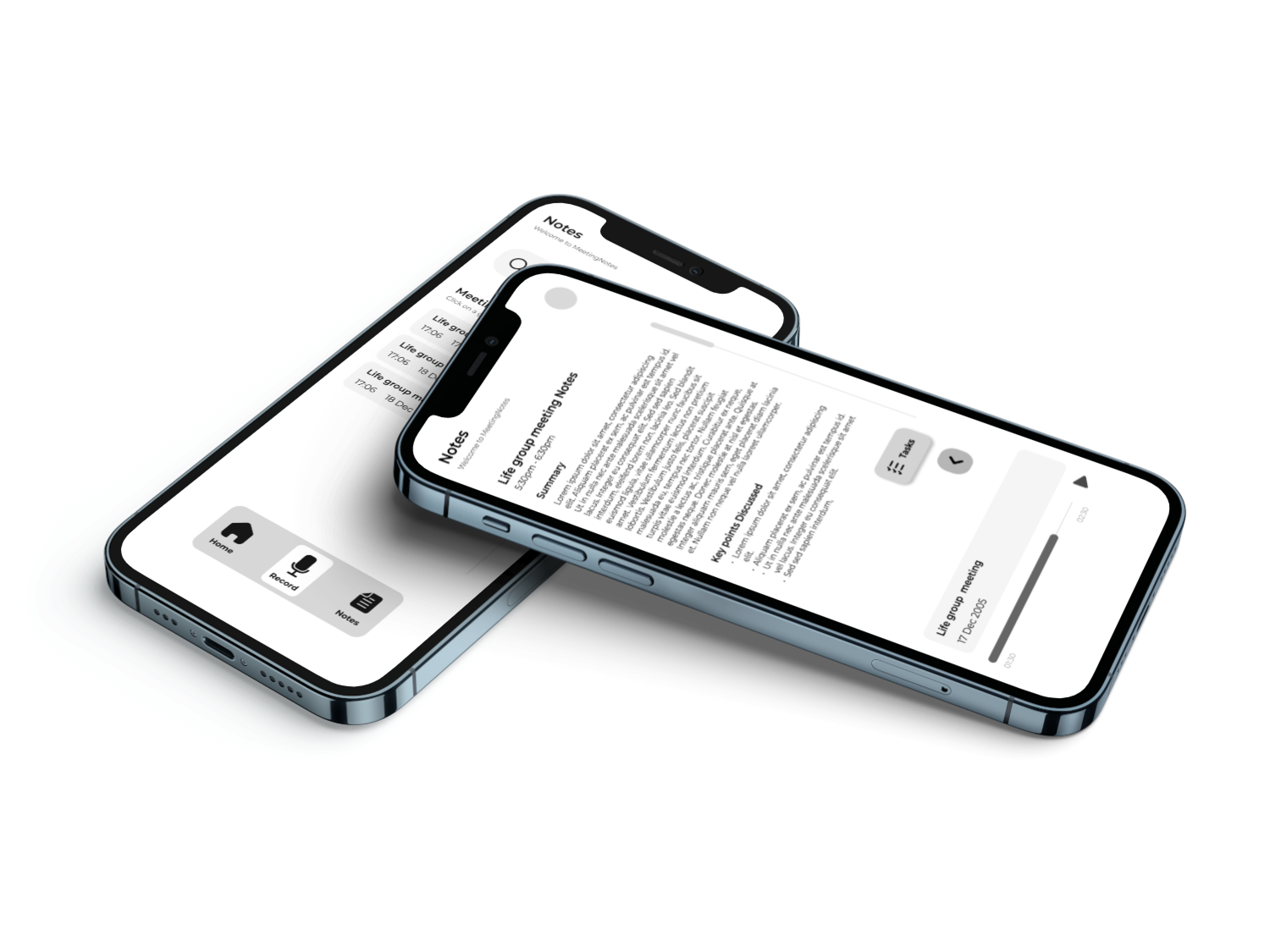
  • Automatic speech-to-text transcription
  • AI-generated summaries highlighting key discussion points
  • Structured breakdown of conversations into digestible sections
  • Focus on clarity and relevance to reduce information overload
Smart Transcription & Summarization Interface

Meeting Organization System

Simplified how users store, categorize, and retrieve meeting information.

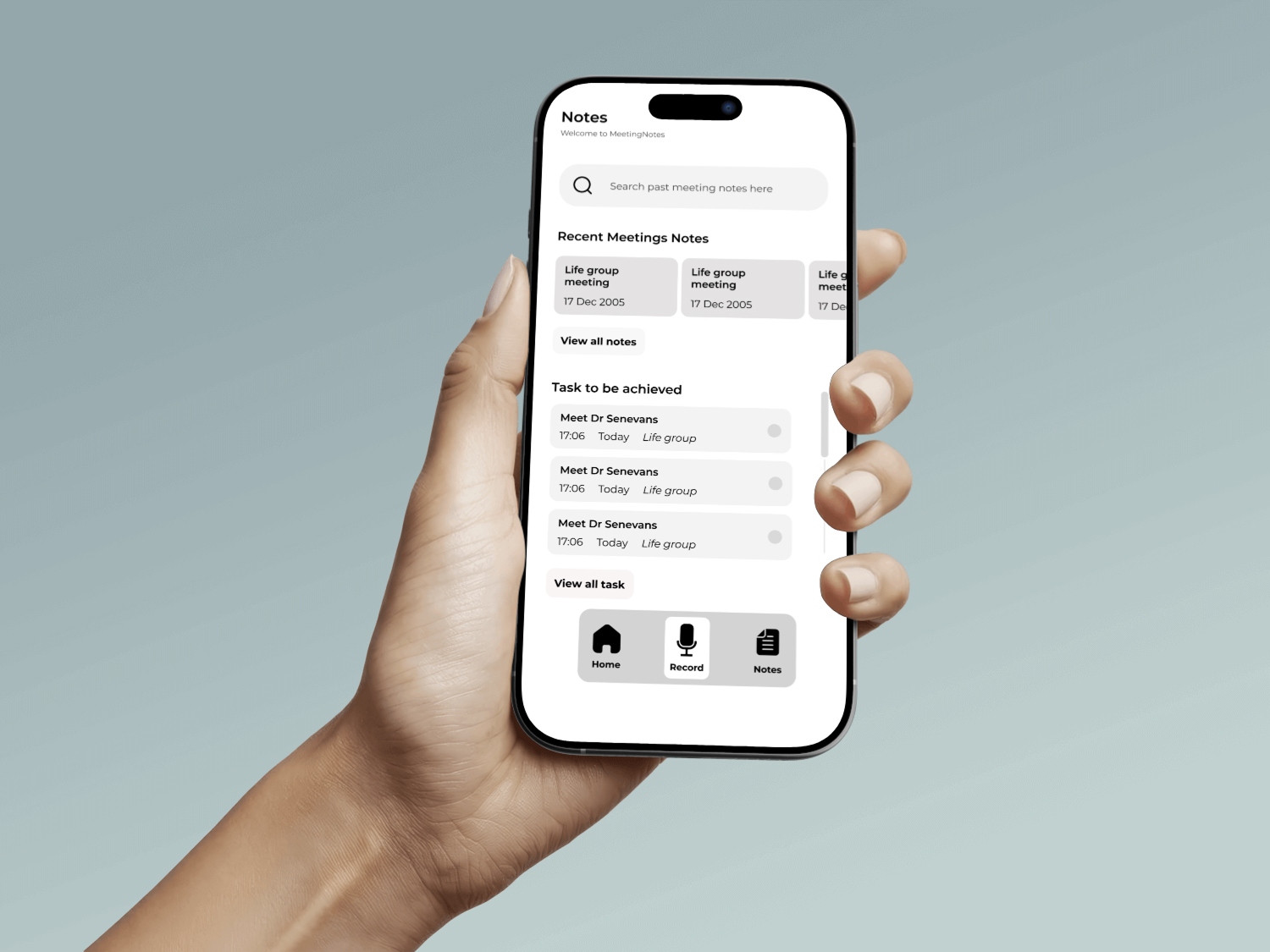
  • Group-based organization for meetings (e.g., classes, teams, projects)
  • Quick naming and saving via modal interaction
  • Easy navigation between past meetings and categories
  • Search functionality for fast retrieval
Meeting Organization System

Insights & Actionable Outputs

Enhanced productivity by turning conversations into meaningful outcomes.

  • Extraction of key points discussed during meetings
  • Ability to identify tasks and follow-ups from summaries
  • Clear separation between audio, transcript, and summarized insights
  • Improved information retention and decision-making
Insights & Actionable Outputs Interface

Learnings & Next Steps

Key Learnings

Simplicity Drives Adoption

Users are more likely to adopt tools that require minimal effort during active tasks. Designing a distraction-free experience was essential to ensure users stayed focused during meetings rather than on the app itself.

Balancing Automation with Control

While AI can automate transcription and summarization, users still need a sense of control and trust in the output. Clear structure and transparency in how information is presented significantly improve usability.

Context Matters in Information Capture

Capturing information is not enough; how it is structured and presented determines its usefulness. Organizing meetings into summaries, key points, and groups greatly enhances retrieval and long-term value.

Future Opportunities

Real-Time Transcription & Summarization

Enhancing the system to provide live transcription and instant summaries during meetings would further improve productivity and user engagement.

AI-Powered Task Extraction

Automatically identifying action items and follow-ups from conversations to help users translate discussions into concrete outcomes.

Cross-Platform Integration

Integrating with tools like calendars, Zoom, or Google Meet to automatically capture and organize meeting data across platforms.

Search & Smart Retrieval

Implementing advanced search with AI-powered context recognition to allow users to quickly find specific moments or topics within past meetings.

Reflection

This project reinforced the importance of simplicity and clarity in design. By focusing on reducing cognitive load, I created an experience that allows users to stay fully engaged in meetings while still capturing and organizing important information. It also deepened my understanding of how AI can enhance productivity when combined with intuitive design and user control. Overall, this project reflects my approach to building solutions that are both efficient and meaningful.

Projects Expertise Experience Contact